
How to Download YouTube Videos to MP4 on Phone and PC

Quick Answer: To convert youtube to mp4, copy the video link from the YouTube app or website, paste it into the Save Downloads search bar, choose your preferred resolution (1080p, 720p, or 480p), and tap Download. The completed MP4 video saves directly to your device storage for offline playback without ads or buffering.
Downloading videos for offline viewing allows you to enjoy educational courses, music concerts, sports highlights, and travel documentaries anywhere—even when traveling on airplanes or in areas with weak cellular coverage. If you need a reliable way to get a youtube to mp4 file with full video clarity and synchronized sound, this complete guide walks you through every step.
What Is the Best Way to Convert YouTube to MP4?
When you look for a youtube to mp4 solution, you want a method that delivers crystal-clear picture quality, pristine stereo sound, and fast download speeds. Modern video platforms store videos in separate visual and sound streams. A high-quality downloader automatically combines both streams into a standard .mp4 file that plays in any media player, smart TV, or phone gallery.
With the Save Downloads Android App, you get an unrestricted, account-free utility that downloads MP4 video files directly to your internal storage. Unlike web converters filled with deceptive pop-ups and slow download queues, Save Downloads uses multi-threaded connections to download files up to 8 times faster.
How to Download YouTube Videos to MP4 on Android
Saving a video to your Android device takes only a few taps:
- Copy the Video Link: Open YouTube, find the video you want, tap Share, and select Copy link.
- Open Save Downloads: Launch the app. The app automatically recognizes the link from your clipboard.
- Choose MP4 Resolution: The format sheet displays real file sizes for 1080p Full HD, 720p HD, and 480p standard definition.
- Tap Download: The file begins downloading immediately. Once complete, you can find the file in your Downloads library and gallery.
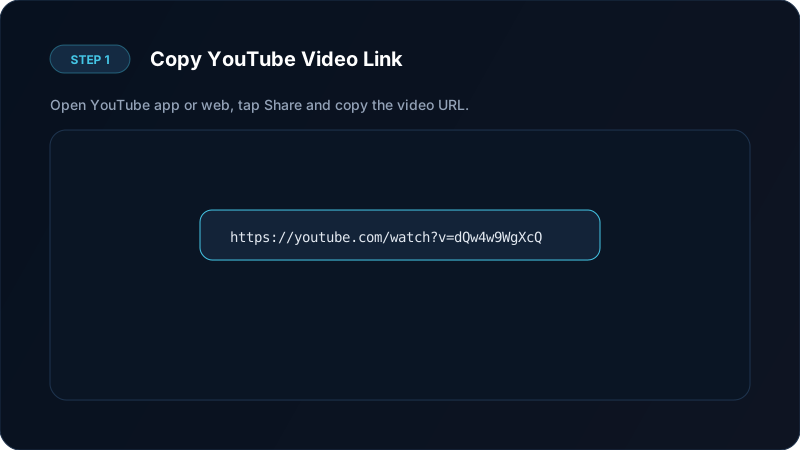
Using a dedicated app ensures your youtube mp4 download finishes smoothly in the background even if your screen turns off.
How to Save YouTube Video to Gallery on Mobile
Many users ask how to save youtube video to gallery so they can view clips offline in Google Photos, Samsung Gallery, or Apple Photos.
When you use Save Downloads on Android, completed files are immediately indexed by the operating system media scanner. You do not need to hunt through hidden system folders or use file manager tools. Simply open your phone gallery, tap the Save Downloads or Movies album, and your MP4 file is ready to play.
If you want to keep personal videos private, Save Downloads also includes an encrypted offline vault. You can move any downloaded MP4 file into the private vault with one tap, protecting it behind a secure PIN or fingerprint lock.

How to Download YouTube Video MP4 on PC and Laptop
If you are working on a desktop computer or laptop, getting a youtube video download mp4 is straightforward:
- Browser-Based Saving: Copy the video URL and use our online tool or desktop downloader to fetch the progressive MP4 stream directly to your computer hard drive.
- Save Downloads for Windows: We are actively engineering a native Windows edition of Save Downloads designed for batch playlist saving, drag-and-drop links, and high-speed multi-threaded downloads.
Whether you use a desktop PC or an Android smartphone, MP4 remains the most universal container format. It plays without extra software on Windows Media Player, QuickTime, VLC, and mobile gallery apps.
Video Quality Comparison: Which Resolution Should You Pick?
Choosing the right format balances file storage with visual fidelity:
| Resolution | Quality Label | Approximate Size (10 min) | Best Suited For |
|---|---|---|---|
| 2160p | 4K Ultra HD | 400 MB – 900 MB | Large 4K TV screens, detailed desktop monitors |
| 1080p | Full HD | 120 MB – 250 MB | Laptops, modern smartphones, tablets |
| 720p | HD Ready | 60 MB – 120 MB | Older smartphones, saving mobile data |
| 480p | Standard Definition | 30 MB – 60 MB | Quick reference, voice-centric podcasts |
If you are saving tutorials with fine text or slides, 1080p is recommended. For quick entertainment where storage is tight, 720p provides great clarity at half the file size. For high-end resolutions, explore our full guide on downloading 4K and 1080p YouTube videos.
Why Choose MP4 Over Other Video Formats?
While web video platforms often stream media in WebM or MKV formats, MP4 remains the gold standard for personal collections:
- Broad Device Support: MP4 plays smoothly on every iPhone, iPad, Android phone, smart TV, car entertainment console, and game console.
- Hardware Acceleration: Mobile processors have built-in decoders for MP4 video, resulting in smoother playback and lower battery consumption.
- Easy Sharing: MP4 files can be sent through messaging apps or edited in video editing software without re-encoding errors.
To learn more about audio-only alternatives, read our guide on how to convert YouTube to MP3 audio.
Ethical and Copyright Guidelines
Before saving videos, keep these important principles in mind:
- Only download content for personal offline viewing when permitted by copyright holders.
- Download public domain educational materials, open-source lectures, and personal video uploads.
- Never re-upload, redistribute, or monetize someone else’s copyrighted creative work without explicit written permission.
- Read our legal guide on downloading video content for detailed fair-use standards.
Frequently Asked Questions
Can I convert youtube to mp4 without losing video quality?
Yes. Choosing 1080p Full HD or 720p HD retains the visual quality of the original upload. Save Downloads fetches the pure direct streams without compression loss.
Why do some YouTube MP4 downloads have no sound?
At 1080p and higher resolutions, video streaming platforms separate the video and sound streams. A quality downloader merges these streams automatically before saving to your device.
How do I save a YouTube video to gallery on Android?
Save Downloads automatically places completed videos in your device public media directory, making them immediately viewable in your gallery app under the Movies album.
Is youtube to mp4 conversion free?
Yes. Save Downloads is 100% free with no subscription tiers, paywalls, or account requirements.
Ultra-Fast VPN & Uncapped Bandwidth
Protect your mobile downloads with military-grade AES-256 encryption. Prevent ISP bandwidth throttling and stream up to 8x faster.
Try Save Downloads for Android
Parallel multi-chunk downloads, lossless 1080p and 4K stream remuxing, WhatsApp status saver, and AES-256 encrypted vault. 100% offline and account-free.
Related Guides & Articles
How to Download a Full YouTube Playlist
Need a youtube playlist downloader? Learn how to download entire video playlists and music albums in one tap for complete offline viewing.
How to Download YouTube Shorts in HD
Looking for a fast youtube shorts downloader? Learn how to download YouTube Shorts in Full HD without quality loss to your phone gallery or PC.
How to Download YouTube Videos in 4K and 1080p
Learn how to perform youtube video download 4k and 1080p Full HD. Discover how to get high-resolution videos with synchronized audio on mobile and PC.