
Internet Download Manager (IDM) Alternative for Android and PC

An Internet Download Manager (IDM) alternative provides accelerated multi-threaded transfers, automatic link capturing, and reliable pause-resume capabilities across mobile devices and desktop computers. If you need a versatile youtube download manager or a free download accelerator on Android and PC, modern alternatives offer clutter-free performance without costly license fees or intrusive pop-up adverts.
Why Do Users Search for an IDM Alternative on Android and PC?
For decades, Internet Download Manager (IDM) has reigned as the premier download acceleration software on Windows. Users love its dynamic file segmentation, robust connection recovery, and ability to squeeze maximum transfer speeds out of slow or fluctuating internet lines. However, modern users face two distinct hurdles:
- No Official Android Version: IDM remains strictly a Windows-only utility. Android smartphone users who want segmented acceleration often turn to mobile tools like 1DM download tools or specialized media savers.
- Paid Registration and Renewal Fees: IDM requires a paid commercial license after a short 30-day trial period. Students and everyday media consumers frequently prefer free, transparent alternatives that offer clean interfaces without perpetual license reminders.
When managing high-definition educational lectures, lengthy podcast interviews, and large open-source software archives, a reliable download manager for PC or Android is indispensable.
How Does a Modern YouTube Download Manager Accelerate File Transfers?
Traditional web browsers download files through a single connection stream. When an origin web server throttles individual stream speeds or network latency increases, browser downloads can slow down drastically or fail entirely upon the slightest interruption.
A high-performance youtube download manager solves this bottleneck through segmented multi-threading:
- Dynamic Chunking: The application splits the requested file into several parallel parts (typically 4, 8, or 16 segments) and requests each part concurrently.
- Connection Multiplexing: By establishing multiple simultaneous requests to the host server, the manager bypasses per-connection bandwidth limits, yielding significantly faster overall completion times.
- Intelligent File Reassembly: Once all segments finish downloading, the software automatically pieces them together into a pristine, uncorrupted MP4 or MP3 file in your storage.
If you frequently download large video series or multimedia files, review our guide to Tubemate alternatives and how to download full playlists to master batch saving.
What Features Should You Look for in an Internet Download Manager Alternative?
When comparing various desktop and Android download accelerators, verify that your chosen utility includes the following core technical features:
| Key Capability | Benefit for Everyday Media Downloads |
|---|---|
| Multi-Thread Segmentation | Accelerates transfer speeds by 300% to 500% over standard single-thread browser downloads. |
| Resilient Pause and Resume | Safeguards large multi-gigabyte transfers against unexpected network drops or laptop lid closures. |
| Organized Queue Prioritization | Allows you to schedule downloads, prioritize urgent items, and prevent bandwidth congestion. |
| Clean, Ad-Free Interface | Avoids spammy full-screen pop-ups and deceptive update banners found in questionable clones. |
| Built-In Media Conversion | Lets you convert video containers into compact MP3 audio or universal MP4 files automatically. |
To convert saved multimedia streams into lightweight audio tracks for mobile listening, explore our dedicated video converter guide.
How Do You Queue and Manage Large Downloads Step by Step?
Managing downloads efficiently ensures your phone battery stays cool and your PC bandwidth remains balanced for other tasks.
Step 1: Copy the Direct Media URL
Navigate to the educational lecture, podcast episode, or open-access video stream you wish to store offline. Copy the complete link from your browser address bar or app share sheet.
Step 2: Paste Into Your Download Manager
Launch your download manager application. Tap or click the Add URL (+) button. Most modern tools automatically detect links copied to your clipboard and pre-fill the destination field.
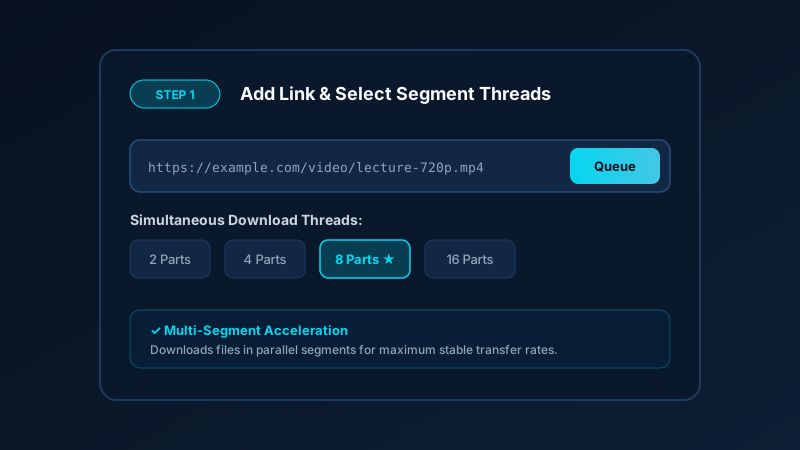
Step 3: Select Concurrent Segments
Choose the number of simultaneous connection threads. For most broadband connections, 4 to 8 parallel segments provide optimal speed without triggering server rate-limits or choking your local router.
Step 4: Monitor and Access Completed Files
Track real-time transfer metrics including transferred megabytes, current transfer rate (MB/s), and estimated time to completion (ETA). Once complete, access your media directly from your device file manager.

How Does Save Downloads Compare With 1DM and Desktop Download Accelerators?
While advanced power users appreciate the thousands of granular settings inside tools like 1DM or JDownloader, casual users often find dense configuration panels overwhelming. Cluttered interfaces loaded with complex regex filters and third-party advertising banners degrade the overall user experience.
The Save Downloads Android app delivers high-speed segmented video and audio saving in an elegant, modern interface:
- Zero Intrusive Ad Clutter: Free of aggressive pop-ups, spyware, or dubious battery cleaners.
- Integrated Video & Audio Engine: Extract 1080p and 4K video clips or crystal-clear 320 kbps MP3 files with one tap.
- Native Private Storage: Organize your personal library safely without exposing sensitive downloads to shared gallery indexers.
- Cross-Device Windows Companion: If you need a PC workflow, pair your setup with our Windows desktop utility.
Best Practices for Managing Bandwidth and Device Storage
When downloading multiple large video files or series, following simple storage habits keeps your phone responsive:
- Download Over Stable Wi-Fi: Avoid burning through mobile cellular data quotas by queuing large multi-segment files when connected to home or office Wi-Fi networks.
- Set Storage Limits: Periodically audit your downloaded media folder to delete watched episodes and free up flash storage space.
- Verify File Integrity: Ensure downloads reach 100% completion before moving files to external USB flash drives or SD cards to prevent incomplete playback errors.
Frequently Asked Questions About IDM Alternatives
Can I use Internet Download Manager (IDM) on Android phones?
No, Internet Download Manager is exclusively built for Windows desktop environments. Android users should use mobile alternatives like 1DM or Save Downloads to achieve similar segmented transfer performance on phones and tablets.
What is the best free alternative to IDM for PC?
Popular open-source and free alternatives on PC include Free Download Manager (FDM) and JDownloader. They provide multi-part acceleration and queue management without charging recurring registration fees.
Does a download manager increase internet speed?
A download manager cannot make your internet line faster than what your internet service provider provides. However, it utilizes your existing bandwidth far more efficiently by downloading in multiple parallel chunks simultaneously.
Why is pause and resume support important in a download manager?
Resume support ensures that if your connection drops halfway through a large 2 GB video download, you can continue from the exact byte where it left off instead of restarting from the beginning.
Disclaimer: Always respect copyright and platform terms of service. Only download videos and audio files that you own or have explicit permission to use for offline study, backup, or personal viewing.
Ultra-Fast VPN & Uncapped Bandwidth
Protect your mobile downloads with military-grade AES-256 encryption. Prevent ISP bandwidth throttling and stream up to 8x faster.
Try Save Downloads for Android
Parallel multi-chunk downloads, lossless 1080p and 4K stream remuxing, WhatsApp status saver, and AES-256 encrypted vault. 100% offline and account-free.
Related Guides & Articles
Snaptube Alternative: Download Video and MP3 Without the Clutter
Looking for a clean Snaptube alternative? Compare Snaptube features, ad density, and speed with Save Downloads for fast, account-free offline media saving.
TubeMate Alternative for Downloading YouTube Videos
Looking for a modern TubeMate alternative? Compare TubeMate legacy interface and codec requirements with Save Downloads for fast, seamless HD saving.
Vidmate Alternative: A Safe Video Downloader for Android
Looking for a safe Vidmate alternative? Compare Vidmate features, ad clutter, and privacy with Save Downloads for fast, account-free offline downloading.