Install help
'App Not Installed' on Android: Causes and Fixes for Each Error
Getting 'App not installed', 'package conflicts' or 'problem parsing the package' when installing an APK? Match the message to the cause and fix it fast.
By Save Downloads Team Published 8 min read How we write and test
Installing an app from an APK file is normal on Android, and most of the time it just works. When it doesn’t, Android’s error messages are short and not very helpful. We distribute our own app as an APK, so we’ve seen every one of these on real phones and in emails from users. The good news is each message points to a specific cause.
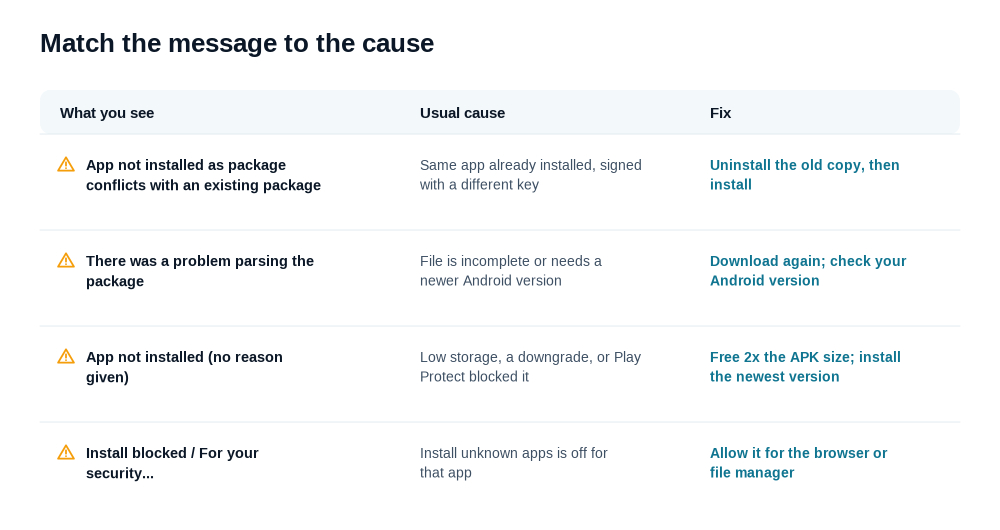
Match the message to the cause
1. “App not installed as package conflicts with an existing package”
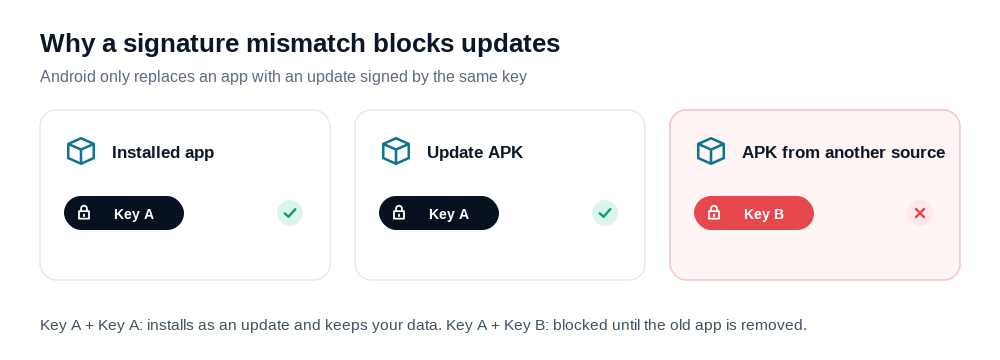
What it means: the phone already has an app with the same package name (the internal ID, such as com.example.app), but the APK you’re installing was signed with a different signing key.
Every Android app is signed by its developer. Android only accepts an update if it’s signed with the same key as the installed version. This is a security feature: it stops anyone from pushing a fake “update” over a real app and reading its data.
Common ways this happens:
- You installed the app from one website and are now installing a copy from another site, which was re-signed.
- You had a developer or debug build and are now installing the official release.
- A modified (“mod”) version is installed, or you’re trying to install the official one over it.
Fix:
- Make sure the new APK comes from the official source. If two sources give different signatures, one of them isn’t the developer’s original.
- Back up anything inside the app that matters (many apps have an export option).
- Uninstall the existing app: Settings > Apps > [app] > Uninstall.
- Install the new APK.
2. “There was a problem parsing the package”
What it means: Android couldn’t read the APK file. Two causes cover almost every case.
The file is incomplete or damaged. Large APKs downloaded on a weak connection sometimes end early, and the browser still shows them as finished. Compare the file size in your Downloads folder with the size listed on the download page. If they differ, download again, preferably on Wi-Fi. Developers who publish a SHA-256 checksum let you confirm the file is byte-for-byte correct; our APK safety guide shows how to check it.
The app needs a newer Android version. Each app sets a minimum Android version. If your phone is older, Android may show this parsing error rather than a clear “not compatible” message. Check your version in Settings > About phone > Android version, and compare it with the app’s stated minimum. (Save Downloads, for example, needs Android 7.0 or newer.)
Less common: the file was renamed from something else, or you’re trying to open a split-APK bundle (.apks, .xapk) as if it were a single APK. Those need an installer app that handles bundles.
3. “App not installed” with no reason
This vague version usually comes from one of these:
- Not enough storage. Installing needs room for the APK, the unpacked app and some working space. As a rule of thumb, keep free space of at least twice the APK size. A 98 MB APK wants about 200 MB free.
- A downgrade. Each version of an app has a number called the version code. Android refuses to install a lower version over a higher one. Install the newest version instead, or uninstall first if you really need the older one.
- Google Play Protect blocked it. Play Protect scans apps installed from outside the Play Store. If it shows a warning, read it. For apps it doesn’t recognise it may say “unsafe app blocked” or ask you to send the app for scanning. Only choose Install anyway if you trust where the file came from.
- Wrong processor type. Some APKs are built only for certain processors (for example, 64-bit ARM). Almost every phone sold in recent years uses ARM, but Android emulators on PCs and a few older devices don’t.
- A work profile or parental control policy blocks installs. Check with whoever manages the phone.
4. “For your security, your phone is not allowed to install unknown apps”
Since Android 8.0, permission to install APKs is given per app, not as one global switch. If you downloaded the file in Chrome, Chrome needs the permission. If you open it from a file manager, the file manager needs it.
- Tap Settings on the warning (it takes you straight to the right page).
- Turn on Allow from this source.
- Go back and tap Install.
When you’re done, it’s good practice to turn the permission off again in Settings > Apps > Special app access > Install unknown apps.
Xiaomi, Redmi and POCO phones
MIUI and HyperOS add their own security scan on top of Play Protect. You may see a countdown before the Install button becomes active, or a prompt to sign in to a Xiaomi account. Waiting for the countdown is enough; signing in isn’t required. If installs fail silently, check Settings > Apps > Manage apps > [your file manager or browser] for an Install unknown apps option, and make sure Security hasn’t blocked the file.
Samsung phones
Samsung’s Auto Blocker (One UI 6 and later) blocks apps from unauthorised sources by default. If it’s on, you’ll be told installs from unknown sources are blocked. You can turn it off in Settings > Security and privacy > Auto Blocker, install the app, and turn it back on.
A checklist before you try again
- Is the file size the same as on the download page?
- Is your Android version at or above the app’s minimum?
- Do you have at least twice the APK size in free space?
- Is an older or differently signed copy already installed? Uninstall it.
- Did you allow Install unknown apps for the app you’re opening the file with?
If all five are fine and it still fails, write down the exact message and your phone model and contact the developer. That information is what they need to help.
Summary
“Package conflicts” means a differently signed copy is installed, so uninstall it. “Problem parsing” means a bad download or an Android version that’s too old. A bare “App not installed” is usually storage, a downgrade or Play Protect. And “not allowed to install unknown apps” just needs permission for the browser or file manager you used.
Sources and further reading
Frequently asked questions
What does 'App not installed as package conflicts with an existing package' mean?
An app with the same package name is already on the phone, signed with a different key. Android won't let one replace the other. Uninstall the existing app first, then install the new APK.
How do I fix 'There was a problem parsing the package'?
The APK is incomplete or damaged, or it needs a newer Android version than your phone has. Download it again on a stable connection, and check the app's minimum Android version.
Will uninstalling the old app delete my data?
Yes, uninstalling removes the app's private data unless the app has its own backup or export. Files saved to shared folders such as Download or Movies stay on the phone.
Is it safe to turn on 'Install unknown apps'?
It's safe when you allow it only for the app you're installing from (your browser or file manager), only for files from a source you trust, and switch it off again afterwards.
Save videos, photos and audio on Android
Save Downloads is free, needs no account, and shows the real file size before every download.
Free · v1.0.3.1 · 97.9 MB · Android 7.0 or newer · How to install