Creators & copyright
How to Repost a Reel Right: Credit, Permission and Copyright
Want to share someone else's reel or video on your page? How to ask permission, credit properly, what 'no copyright intended' really means, and what to avoid.
By Save Downloads Team Published 7 min read How we write and test
Reposting is how a lot of good content travels: a creator’s tutorial reaches a new audience, a local business shares a customer’s video, a page curates the best clips on a topic. Done well, everyone benefits. Done badly, the original creator loses views and credit, and the reposting account can lose the post, or the whole account, to copyright strikes.
This guide is general information, not legal advice. Laws differ by country, but the practical rules below hold up almost everywhere.
The two questions to ask first
1. Am I keeping this, or publishing it? Saving a video so you can watch it offline, on a flight or after the post is deleted, is personal use. Posting it on your own page, channel or ad is publishing. The rules for the second are much stricter.
2. Can I use the platform’s own sharing tools instead? Sharing a post to your story, sending it in a DM, or using a Remix or Duet feature keeps the creator’s name, links back to them, and is covered by the platform’s terms. When those tools do what you need, use them. You don’t need to download anything.
Reposting the right way: four rules
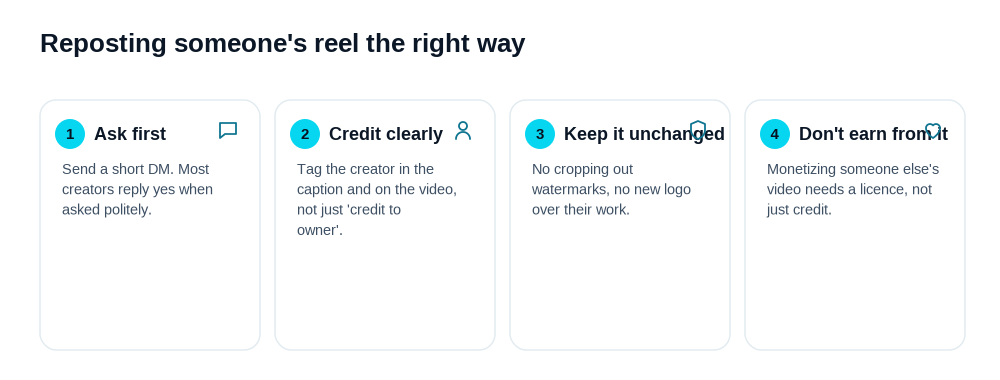
1. Ask first
A short, specific message works best:
Hi! I loved your reel about making chai for a crowd. Could I repost it on @ourcafe with full credit and a tag? Happy to share the stats with you afterwards.
Keep the reply. A screenshot of “yes, go ahead” is your record if anyone questions it later. If they say no, or don’t reply, don’t post it.
2. Credit clearly
Credit means the viewer can find the creator in one tap:
- Tag the creator at the start of the caption: ”🎥 by @creatorname”.
- Tag them on the video itself as well, if the platform allows.
- Don’t hide credit at the end of 30 hashtags, and avoid vague lines like “credit to the owner” or “DM for credit”.
3. Keep the work intact
Don’t crop out the creator’s watermark, cover it with your logo, re-edit it so it looks like yours, or replace their audio with a trending sound. Small changes don’t make a video “yours”, and removing watermarks is one of the things that makes creators file reports.
4. Don’t earn from it without a licence
Running ads, sponsorships or paid promotion on someone else’s video is commercial use. A thank-you in the caption doesn’t cover it. Brands that want to use creator content in ads normally sign a licence or pay a fee.
What “no copyright intended” really means
Nothing, legally. Captions such as “no copyright intended”, “all rights to the owner” or “for entertainment only” don’t give you permission. They just show the poster knew the content wasn’t theirs. The same goes for “fair use” written under a straight repost.
Fair use (in the US) and fair dealing (in the UK, Pakistan, India and many Commonwealth countries) do exist. They allow limited use of copyrighted work for things like criticism, review, news reporting, teaching and research. Whether a use qualifies depends on the purpose, how much is used and the effect on the original’s market. A full reel reposted to entertain your followers rarely qualifies. A short clip inside your own review video that critiques it might. If your business depends on the answer, get proper advice.
Usually fine and usually not
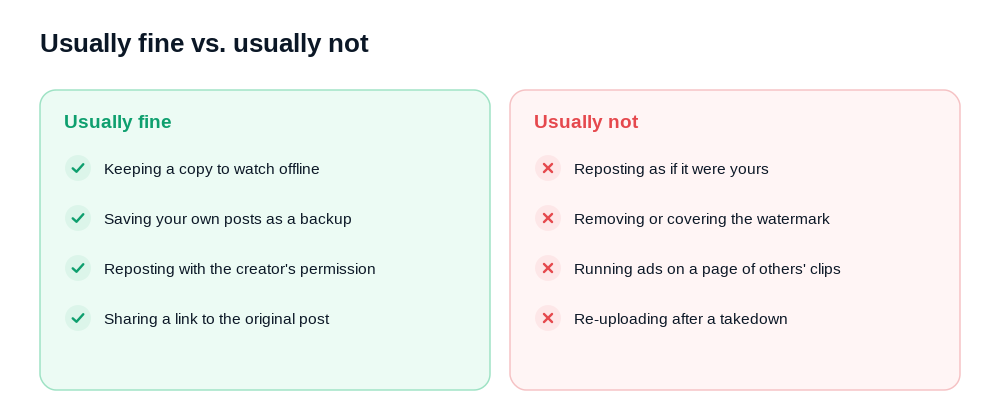
Reposting your own content
Downloading your own reels is completely fine and good practice. Platforms change, accounts get locked, and the original files on your phone get deleted. Keeping a copy of everything you’ve posted means you can cross-post to another platform or rebuild your portfolio later. Note that if you used licensed music from the platform’s library, that music licence may only cover the original platform. When cross-posting, you may need to swap the audio.
How download apps fit in
Tools like Save Downloads make it easy to keep a public video on your phone. That’s useful, and it’s also why we ask users to respect creators. The app has no account system and doesn’t post anything anywhere; what you do with a saved file is up to you, and the rules above apply. Our article on whether it’s legal to download videos covers personal saving in more detail.
If your own video is reposted without permission
- Message the account and ask for credit or removal. Many people genuinely don’t know the rules.
- If they refuse or ignore you, use the platform’s copyright report form. Instagram, Facebook, TikTok and others accept reports from the copyright owner.
- Keep evidence: links, screenshots and your original file with its date.
Summary
Credit is good manners, but permission is what makes a repost acceptable. Ask first, credit clearly at the top, keep the creator’s watermark and audio, and don’t earn money from someone else’s work without a licence. “No copyright intended” means nothing legally. Saving a video privately to watch later is a different, much lower-risk thing from republishing it.
Sources and further reading
Frequently asked questions
Is it legal to repost a reel if I give credit?
Credit alone doesn't give you the right to repost. Copyright belongs to the creator, so you need their permission unless the platform's own share or remix tools are used. Credit is good manners on top of permission, not a replacement for it.
Does 'no copyright intended' protect me?
No. It has no legal effect. If you use someone's work without permission, adding that phrase doesn't change anything.
Can I save reels to watch offline?
Keeping a copy for your own offline viewing is a very different thing from republishing it. Saving public content privately is common and low-risk; reposting or selling it is where permission matters.
What should I do if someone reposts my video without permission?
Ask them to remove it or credit you. If they refuse, use the platform's copyright report form. Instagram, TikTok and Facebook all have one.
Save videos, photos and audio on Android
Save Downloads is free, needs no account, and shows the real file size before every download.
Free · v1.0.3.1 · 97.9 MB · Android 7.0 or newer · How to install