
WhatsApp Status Video Download: Save Statuses Before They Expire

Performing a WhatsApp status video download allows you to preserve memorable family clips, inspirational quotes, and trending music videos before they vanish after the standard 24-hour expiration window. If you are searching for an easy method for whatsapp video download and saving status updates directly to your Android gallery, this guide covers the safest and cleanest solutions.
How Does WhatsApp Status Video Download Work Before Stories Disappear?
WhatsApp status updates operate on a strict 24-hour ephemeral timeline. Once twenty-four hours elapse from the moment a contact posts a video or photo, the status automatically deletes itself from WhatsApp servers and disappears from your status feed.
Many users resort to screen recording their phone screen to capture these fleeting videos. However, screen recording introduces multiple frustrating issues:
- Degraded Video Quality: Screen recording re-compresses the video stream, resulting in pixelated visuals and blurry text.
- Unwanted Interface Elements: The status author’s name, timestamps, and on-screen progress bars get permanently baked into your recorded video.
- Audio Distortion & Muting: Internal system audio may record at lower fidelity or capture unwanted microphone background noise.
By using a dedicated whatsapp status video download method, you copy the original cached source file directly into your permanent storage—retaining crisp high-definition visuals and clean audio without any screen artifacts.
Why Do WhatsApp Status Videos Expire After 24 Hours?
WhatsApp designed the Status feature around ephemeral social sharing, mirroring stories on other major platforms. Temporary media encourages users to share spontaneous moments without worrying about permanent public archiving.
However, contacts often share valuable travel recommendations, recipes, family event highlights, and artistic video edits that you may wish to revisit later. Knowing how to capture a status video download ensures you never lose meaningful personal memories shared by your close circle.
If you also enjoy saving viral content from other social apps, check out our guides on how to save Instagram Reels to your gallery and how to save TikTok videos.
Step-by-Step Guide: How to Save WhatsApp Status Videos to Your Gallery
Saving a status clip to your phone’s camera roll takes less than thirty seconds when you follow these four simple steps:
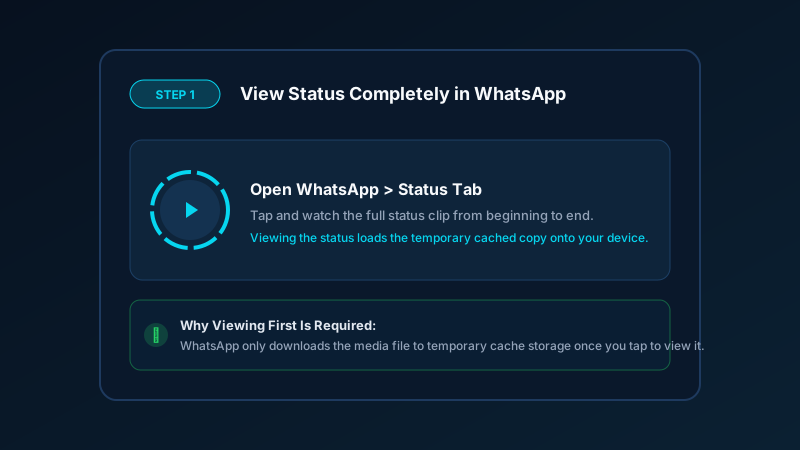
Step 1: Watch the Status in WhatsApp
Open WhatsApp, navigate to the Updates / Status tab, and tap the status you want to save. Watch the entire video from start to finish. This step is essential because WhatsApp only downloads the media to your local device cache when the status is actively viewed.
Step 2: Open Save Downloads or Status Saver
Launch the Save Downloads Android app or your preferred file manager. The app automatically scans your local temporary media cache and populates a visual grid of all recently viewed statuses.
Step 3: Preview the Video Clip
Tap the thumbnail of the status clip to inspect it in full screen. Ensure the video resolution, sound quality, and clip length match what you want to keep.
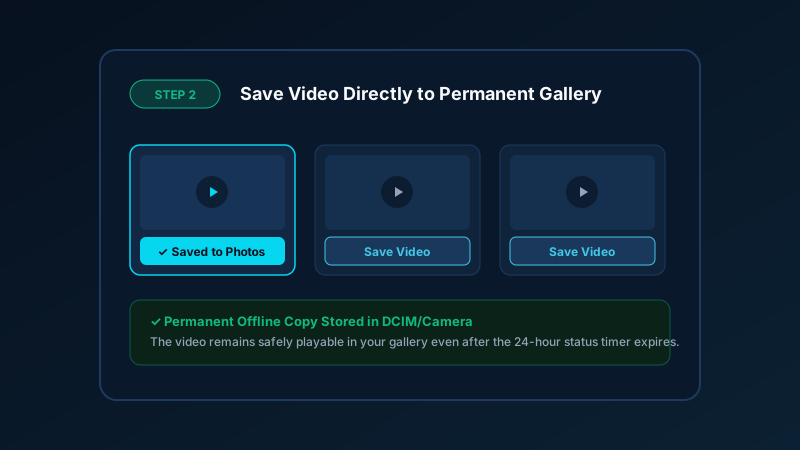
Step 4: Save to Gallery
Tap the Save / Download button. The file is instantly copied from the temporary cache folder into your permanent DCIM/Camera or Movies/WhatsApp storage directory. You can now watch, edit, and share the video anytime offline.
Where Are WhatsApp Status Videos Temporarily Stored on Android?
For users who prefer manual file management without installing extra utilities, Android stores all viewed status files in a hidden system directory. You can locate them using any advanced file manager that supports viewing hidden files:
- Open your device file manager (such as Files by Google or Samsung My Files).
- Go to Settings and toggle on Show hidden system files.
- Navigate to:
Internal Storage > Android > media > com.whatsapp > WhatsApp > Media > .Statuses. - Inside this folder, you will find all recently viewed images and
.mp4video files. - Copy the desired
.mp4file and paste it into yourDCIM/CameraorDownloadsfolder before the 24-hour cache cleanses.
Because manual navigation requires digging through system file trees every day, a dedicated video saver app provides a much faster and user-friendly experience.
How Can You Save High-Quality WhatsApp Status Audio and Clips Without Screen Recording?
Often, contacts post creative statuses featuring beautiful background songs or instrumental melodies. If you only want the soundtrack rather than the video footage, you can extract the audio track effortlessly:
- Original Source Fidelity: Extracting audio from a saved MP4 preserves clear 128 kbps to 320 kbps acoustics, avoiding external room noise captured by phone microphones.
- Convert to Universal MP3: Use a lightweight video converter to turn the saved status video into an offline MP3 audio track for your music player or ringtone library.
- Preserve Battery & Storage: Audio files occupy less than one-tenth the storage space of HD video files, allowing you to store hundreds of favorite tracks on your phone without filling your memory card.
Privacy and Etiquette: Safe Practices When Downloading Statuses
While saving status updates is technically simple, observing mutual privacy and copyright etiquette is essential:
| Best Practice | Why It Matters |
|---|---|
| Ask for Permission | If a contact posts private family or personal moments, ask before saving or reposting their content. |
| Credit Original Creators | When sharing creative animations, comedy skits, or educational infographics, credit the author. |
| Avoid Reposting Private Media | Never share someone’s private status into public group chats without their consent. |
| Verify Legal Rights | Learn more about copyright boundaries in our guide to is it legal to download videos. |
Frequently Asked Questions About WhatsApp Status Video Download
Does WhatsApp notify the person if I download their status video?
No. WhatsApp has no mechanism to notify users when a status is saved. When you view a status, the author only sees that you appeared in their standard ‘Viewed by’ list. Once the media is viewed, copying it from local cache is an entirely offline operation.
Why do I need to view the WhatsApp status video first before saving it?
WhatsApp does not automatically store media files on your device until you request them by tapping on the status. Watching the clip forces WhatsApp to fetch the video data and store it temporarily in your device cache.
Can I save WhatsApp status videos in original HD quality?
Yes. Copying the cached video preserves the exact resolution and frame rate sent by WhatsApp servers. This produces much sharper visuals and clearer sound than screen recording.
Where are WhatsApp status videos stored on Android phones?
Viewed statuses are temporarily cached in Android/media/com.whatsapp/WhatsApp/Media/.Statuses. Because folder names starting with a dot are hidden by Android, you must enable ‘Show hidden files’ in your file explorer to see them manually.
Disclaimer: Respect personal privacy and copyright. WhatsApp statuses are shared by friends, family, and contacts. Always ask for permission before redistributing or sharing personal status videos.
Ultra-Fast VPN & Uncapped Bandwidth
Protect your mobile downloads with military-grade AES-256 encryption. Prevent ISP bandwidth throttling and stream up to 8x faster.
Try Save Downloads for Android
Parallel multi-chunk downloads, lossless 1080p and 4K stream remuxing, WhatsApp status saver, and AES-256 encrypted vault. 100% offline and account-free.
Related Guides & Articles
4K Video Downloader: How to Download High-Resolution Videos
Looking for a true 4k video downloader? Learn how to download Ultra HD 4K and 1080p videos with synchronized sound for offline viewing on TV and mobile.
Best Video Downloader App for Android in 2026
Looking for the best video downloader app for Android? Discover top features to check: offline speed, 1080p/4K with sound, private vault, and no accounts.
How to Download a Full YouTube Playlist
Need a youtube playlist downloader? Learn how to download entire video playlists and music albums in one tap for complete offline viewing.