
WhatsApp Status Folder on Android: Where Statuses Are Stored
Viewed WhatsApp statuses are cached in a hidden .Statuses folder. Here is the exact path on Android 11+, how to see it, and how long the files stay.
By Save Downloads Team Published 6 min read How we write and test
Statuses disappear after 24 hours, which is the whole point of them. But when you open a status, WhatsApp has already downloaded the photo or video to your phone so it can play it. That cached copy sits in a hidden folder, and knowing where it is explains how status saver apps work and why they sometimes show nothing.
The exact folder path
On phones running Android 11 or newer, viewed statuses are stored here:
Internal storage > Android > media > com.whatsapp > WhatsApp > Media > .Statuses
For WhatsApp Business, swap the app folder:
Internal storage > Android > media > com.whatsapp.w4b > WhatsApp Business > Media > .Statuses
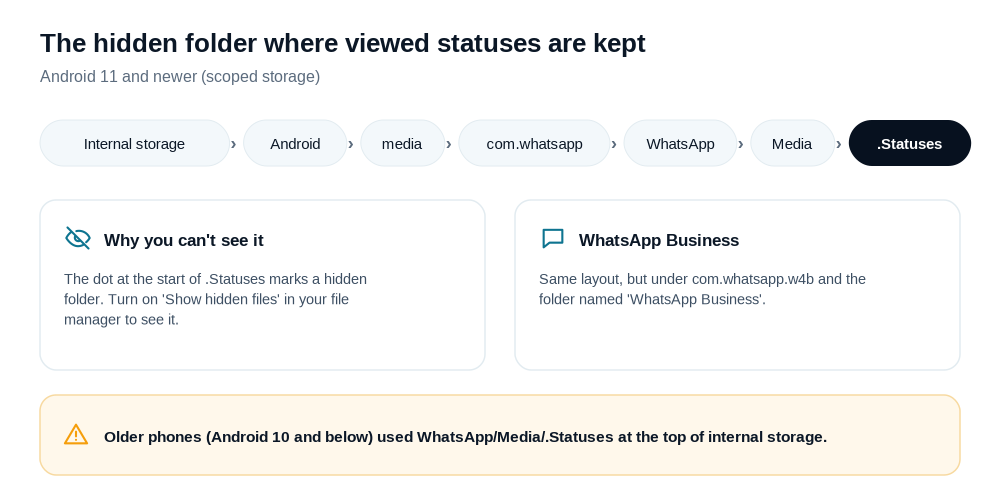
On Android 10 and older, WhatsApp used a folder at the top of internal storage: WhatsApp > Media > .Statuses. If you updated an old phone, you may see both, but only the new one is used.
A common mix-up: people look in Android/data/com.whatsapp. That’s the wrong folder. Status media is under Android/media, not Android/data.
Why the folder is hidden
On Android, any file or folder whose name begins with a dot is hidden from normal views. WhatsApp names the folder .Statuses so these temporary files don’t flood your gallery with other people’s photos. To see it:
- Files by Google: tap the menu (three lines) > Settings > turn on Show hidden files.
- Samsung My Files: three dots > Settings > Show hidden system files.
- Xiaomi File Manager: three dots > Settings > Show hidden files.
Then browse to the path above. You’ll see files with long random names ending in .jpg or .mp4. Each is one status you viewed.
Why statuses vanish from the folder
The folder is a cache, not an archive. Its contents follow the status itself:
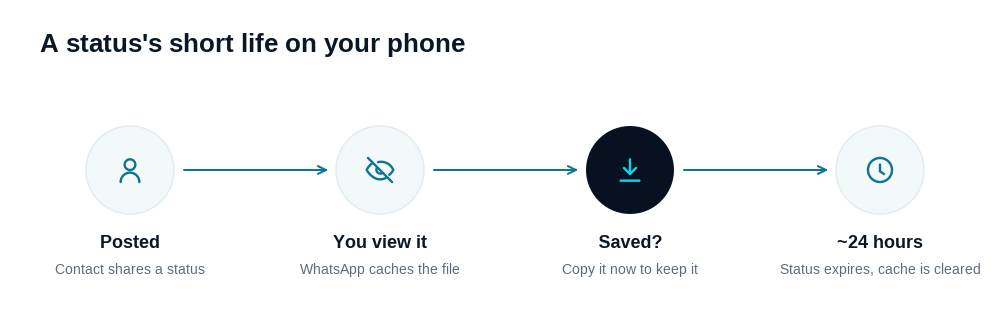
- A contact posts a status. Nothing is on your phone yet.
- You open it. WhatsApp downloads the file into
.Statuses. (Photos and short videos may download in the background when you open the Updates tab.) - About 24 hours after it was posted, the status expires and WhatsApp clears the cached file, usually within a day.
So an empty folder normally means one of two things: you haven’t opened any statuses recently, or they’ve expired. Open WhatsApp, view the status, and then copy the file.
Why many status saver apps stopped working
Before Android 11, any app with storage permission could read the WhatsApp folder. Android 11 introduced stricter rules (scoped storage) that stop apps from browsing other apps’ folders freely. A status saver now has to ask you, through Android’s own folder picker, for access to that one .Statuses folder. If an app still asks for “all files access” just to save statuses, it’s asking for more than it needs.
That’s how the status saver inside Save Downloads works: the first time, it opens Android’s folder picker on the right folder and you tap Use this folder. After that it lists the photos and videos you’ve viewed, sorted into All, Photos and Videos, and saves the ones you pick into a normal folder that your gallery can see. Our WhatsApp status guide walks through it with screenshots from a real phone.
Copying a status by hand
You don’t need any app to keep a status:
- View the status in WhatsApp.
- Open your file manager with hidden files shown and go to the
.Statusesfolder. - Sort by date so the newest file is first.
- Long-press the file, choose Copy, and paste it into Pictures or Download.
Once it’s outside .Statuses, WhatsApp won’t clear it.
A note on manners
Statuses are shared with a small group for a short time, often deliberately. Keeping a status a friend posted for you, a recipe, a notice or your own status is normal. Forwarding someone’s personal status to people they didn’t share it with is a different thing. If in doubt, ask them.
Summary
Viewed statuses are cached in Android/media/com.whatsapp/WhatsApp/Media/.Statuses (or the w4b equivalent for Business). The folder is hidden because of the dot, and files disappear about a day after the status expires. View the status first, then copy it out of the folder or use a status saver that asks for access to just that folder.
Sources and further reading
Frequently asked questions
Where is the WhatsApp .Statuses folder on Android 11?
Internal storage > Android > media > com.whatsapp > WhatsApp > Media > .Statuses. For WhatsApp Business it is under com.whatsapp.w4b and a folder called WhatsApp Business.
Why can't I see the .Statuses folder?
Folders whose name starts with a dot are hidden on Android. Turn on 'Show hidden files' in your file manager's settings and it appears.
Does the person know if I save their status?
Viewing a status shows up in their viewer list as normal. Copying the file from your phone's cache doesn't send them any extra notification. Still, ask before sharing someone's status elsewhere.
Why is the .Statuses folder empty?
Only statuses you have opened are cached, and WhatsApp clears them after they expire. Open WhatsApp, view the status you want, then copy it.
Save videos, photos and audio on Android
Save Downloads is free, needs no account, and shows the real file size before every download.
Free · v1.0.3.1 · 97.9 MB · Android 7.0 or newer · How to install